Showing posts with label Product Reviews. Show all posts

Wednesday, May 21, 2014

Ashley Bridget Journey Bracelet Review


What I bought and why

I bought this Ashley Bridget Journey bracelet as a Christmas present for my mother. It showed up on my Facebook newsfeed as a suggested post. Those usually annoy me and I ignore them whenever possible. However, this was something that I thought my mother would love and it involved a coupon code! I"m a sucker for a coupon code! The only thing better than a coupon code is a coupon code with free shipping. I really need to work on my online shopping addiction.

The process

The ordering process was very simple. I was able to pay with PayPal which just made my day. I love PayPal! I ordered it on May 10th and I had it in my mailbox on May 20th. It could have been there earlier, but I didn't check my mail on the 19th. It came in a plastic envelope. I didn't take a picture of the envelope.

Inside the envelope

The bracelet came in a cute little drawstring mesh bag. 


The bracelet is 6" from end to end not including the clasp and the extension chain. The clasp and the extension chain give it about another 1-3/4" in length. 


It fit on my big wrist. 


Here is the clasp with the extension chain. You've got quite a bit of space there so if you have a small wrist, you can just put the claps on a different ring. 


My Overall Thoughts

The regular price for this is $48.00. I would never pay $48.00 for this bracelet. I had a 60% off coupon so it was $19.00 plus shipping. For some reason, I don't remember having to pay for shipping, but it was on my invoice. I was expecting the rope to be a bit thicker and I was expecting a different type of clasp situation. While I appreciate the versatility of having this type of clasp, it just seems so fragile and it's really difficult to put on. I couldn't put it on by myself. My husband had a hard time putting it on me. Neither of us has a lot of experience with jewelry, so we're not the best people to judge on that regard. I'm not sure how the ropes are stuck inside of those end pieces, but it just feels very fragile like if it snagged on something, the ropes might pull out. I know my mother will love it, and I'm glad I bought it, but I really would never pay full price for this thing. I've never heard of Ashley Bridget, so maybe I'm just out of the loop and the name is worth the money. I don't think the product is worth the money unless you get a 60% off coupon like I did. Even then, I'm questioning if I would have bought this at a store with a $25.00 price tag. (What I paid with shipping)


Sunday, May 18, 2014

Glamorise Women's No-Bounce Full-Support Sport Bra Review


What I got and why

I been having dreams about running. I'm very happy in these dreams. It makes me want to run. In order to run, I need to find something that will hold the girls still otherwise, I won't be running for long. I also want to stop modifying jumping jacks whenever they are in the workout DVDs that I do. Again, the bouncing around is just not comfortable so I don't do them. I set out on a mission to find a sports bra to help with my problem. This was my first attempt. I Googled Plus Sized Sports Bras and found this one on the Just My Size website. It had 84 reviews and only 2 of them were 1 star reviews. It had 66 5 star reviews, but it was $26.00 and I would also have to pay for shipping. Since Amazon.com has everything a girl could want and more, I checked to see if they had this bra. To my delight, they did actually have it! Out of 1484 reviews 763 were 5 stars and there were less than 100 1 stars. It was also only about $17.00. Score! I snatched that baby up. I took  my husband's advice and ordered two since I hate to pay for shipping and couldn't find anything else to get me to free shipping. 

Shipping

I ordered it on May 8th and received it on May 17th. It arrived via the Post Office. 

The Packaging

It came in this plastic resealable packaging. It's resealable in case you want to return it. 


Inside the plastic bag, was another plastic bag that contained the bra. This is the front (or back.)


This is the back (or front) of the plastic bag)


This little insert came in the bag. There was only one blurb in English.


This is a blown up version of the English blurb. 


This is the bra. It has adjustable straps and clasps in the back. There are four hooks. There are a few rows of hooks so once it stretches out, you can cinch it up a bit tighter. 


The fit and the bounce test

I wear a 44F (or a 44DDD, it's all the same thing) I bought a 44F. The bra fit, which was a positive sign. I was able to get into it and get everything all cinched in. The band was a bit tight, but it's a sports bra, so I was expecting that. I wasn't expecting the uncomfortable thing that sticking into the middle of my back. I never did figure out what it was, but for the first hour that I had it on, every time I moved, something would brush up against my spine. It was annoying, but not painful. Eventually, that went away. I wore the bra on a walk that we took. It wasn't a strenuous walk or anything. The bra was comfortable enough to walk around in. I felt like things were strapped in pretty good. I tried some jumping jacks and things got ugly. Below is a 25 second video that you may or may not want to actually watch. it's rather scary. If you watch it, you might wonder why I'm worried about my boobs bouncing around instead of my belly bouncing around. Well, it's all about baby steps. If I can get the boobs cinched down well enough to make it not painful to run, I can run and do jumping jacks and shrink the belly down. Or I can figure out where to get one of those body suit things that I see in The Biggest Loser workouts when the guys do jumping jacks and their shirts go up. 


My overall thoughts

I have decided to return one of the bras and keep one of them. I got more support from it than my regular bras. I was planning on showing a video of me doing jumping jacks in one of my regular bras, but I decided that I couldn't even handle watching that one. So anyway, I'm contemplating buying a 44E instead of the F to see if a smaller cup size will hold these babies in a bit better. My other thought was to buy an ace bandage and see if I can just wrap them up during my workouts. I've heard good things about the Enell bra, but they are pretty spendy. I wouldn't mind spending that kind of money on a bra if I thought I was going to be in a specific size for an extended period of time, but in theory, I should need smaller bras soon enough. The band size and the cup size should shrink as I lose weight. I don't think I can afford a $60 that I might only get a couple months out of. 

Tuesday, May 6, 2014

nomorerack.com Genuine Diamond Accent Heart Bracelet in Sterling Silver


What I picked and why

I got a bracelet fro NoMoreRack.com. It was made out of yellow gold plated sterling silver. It says that it has black diamonds on it. I got an email with a $15.00 off of a $30.00 purchase coupon. I'm a sucker for a good deal. I can't pass up $15.00 off! When combined with the free shipping that they offer for 3 hours each day, it's just a no brainer. I got this as a Christmas present for a 16 year old. (She'll actually be 17 by Christmas). I picked this because we got her a gold necklace with a heart shape and some blue diamonds that are so dark that they look black. I thought this would go with it. Above, is the picture off of the website. 

The Unveiling

It came inside of a plastic bag inside of a plastic bag inside of a padded envelope. It also contained a jewelry box picture below and my invoice. The first picture here is the bracelet inside of the plastic bag.


This is the bracelet once it was removed from the plastic bag. The hearts look more gray in person, but the farther you are from them, the blacker they appear. 


Here is the cute little jewelry box that it comes with the bracelet. It's very shimmery.


Here is the bracelet inside of the jewelry box. It came with a little square of cotton inside. 


This is the bracelet on my chubby arm. The camera really does add 10 pounds, and it put it all right on my hand and forearm! Wowzers! Check out my awesome photography skills. I managed to get a picture where you can see the glint from the light.   


The bracelet was too small to fit around my chubby wrist. It's 7 inches from end to end, not including the clasp.


My Thoughts

It seems fragile without feeling cheap. I would probably destroy it myself on the second or third use because I can't tell you how many times I whack my hand into the wall or a door or a stair rail. I'm just a bit too clumsy for jewelry. I think it will last for anyone who doesn't walk into walls. The clasp was a bit hard to do, but a larger clasp would disrupt the flow of the design. I do like the bracelet, but I don't think it's worth the over $200 that they claim it's worth. It listed for $39.00, but I got it for $15.00 off of that. I'm satisfied with what I paid for it. 

Wednesday, April 9, 2014

Sheila G's Brownie Brittle Chocolate Chip


Sheila G's Brownie Brittle Chocolate Chip

My husband brought this stuff home tonight. At first, I was a bit miffed at him. I'm trying to lose weight. I have good weeks and bad weeks with that. This had been a good week. We both love chocolate. He went into the kitchen and started opening a bag of something, but wouldn't tell me what it was. I told him that it sounded very yummy whatever it was. He then sat down with these little squares of chocolate. He ate one and made a happy sound. I was then intrigued. He handed me one. I thought about not eating it, but what harm could come from one tiny little piece of chocolate. Once I ate it, I automatically regretted the decision. It was soooo yummy! I was pretty bummed that I had found one more thing I couldn't have while trying to lose weight. He got the bag and handed it to me. It said 120 calories per serving. I figured that would be like four pieces. I was wrong! It was half the bag! (Calling 1 ounce of chocolate yumminess half the bag makes it sound bigger) I finally found something that I can eat to quench the chocolate craving!!!!!!! My hubby is awesome! You're pretty great for making this stuff.

The picture below is a blown up version of this little bit of yumminess. The pieces were about one square inch. Thy are pretty thin. They are are crunchy like a hard cookie, but once you chew them up, you are left with this chocolate yumminess. I've been wanting chocolate on this weight loss journey. I've been munching on some Dove Dark Chocolate miniatures at night, but those are 220 calories for 5 pieces. If I can keep myself to just one or two pieces, it's great, but a lot of times, I just go for all five. Since I've been logging my food this week, I've cut out my chocolatey dessert. It wasn't a planned thing, but when I think about grabbing them, I just feel like I shouldn't do it. I didn't want to deal with having to put the food into the BodyMedia software and I didn't want to post any really high calorie days for my week of food tracking. This thing hit the spot! This bag was two ounces. One service is one ounce, so for every piece my husband ate, I snagged one too. Eventually, he got tired of me saying, "Did you just eat one?" He ended up counting out the rest of the bag and dishing them out. 

I am now on a mission to try the remaining flavors! You can buy it from their website, but I want the small bags, and those are only sold in a 24 count which is about $45.00. It's inexpensive and totally worth it, but I don't know if we should have that many in the house! The small bags are perfect because we can split the bag and have one serving each. Then the bag is empty! If we get the 16 ounce bags, there's no way I will be able to keep myself to just one serving. I would probably eat half the bag just cooking dinner! 

The website has a store finder. However, the store that my husband bought them at was not listed. He said they only had this flavor. I'm going to check out Safeway and see if they have it. You can check out the store locator to find a store near you! You can also check out the full nutritional content and ingredients


Saturday, March 29, 2014

Netflix DVD Trial


I wanted access to more Leslie Sansone DVDs so I got a Netflix DVD subscription free trial for 30 days to see what they had to offer and how quickly I could turn things around. We already had a streaming subscription, but I wasn't able to find any streaming workouts. I couldn't find a list of Netflix DVDs without signing up for the DVD subscription, and it was driving me nuts not knowing, so I signed up. My subscription will be over on Monday, but I'm writing this up since I have time right now.

They have a few different pricing options. There are three Unlimited options. One disc out at a time is $7.99 or $9.99 with Blue-ray. Two discs out at a time is $11.99 or $14.99 with Blue-ray. Three discs out at a time is $15.99 or $19.99 with Blue-ray. You can also do a Limited option where you can get one disc at a time for a max of 2 discs per month for $4.99 or $5.99 with Blue-ray.

In my free trial I was able to get 6 discs. The timeline is below

March 1st - I joined.
March 4th - I got my first DVD. I joined on a Saturday, so the first disk took a little longer to arrive.
March 5th - I shipped the DVD back.
March 7th - I received my second DVD.
March 10th - I shipped it back
March 12th - They sent an email that the disc that I wanted wasn't available from the closest warehouse so they were going to ship it from another location, but it would take a couple extra days to arrive.
March 14th - I received my third disc which was an extra disc as a consolation since my other disc was delayed.
March 17th - I received my fourth disc which was the one that was shipped from the other warehouse.
March 19th - I sent back the two DVDs.
March 22nd - I received my fifth disc.
March 25th - I sent back the disc.
March 29th - I received my sixth disc.


I probably could have gotten one extra DVD, but a couple of the DVDs had two workouts on them so I had to do both workouts before I sent them back. Each disc cost me $1.33. If I had been able to get one more disc out of it, it would have knocked it down to $1.14. If I could have gotten two more, it would have gotten them down to $.99 each disc. I thought about going for one more month and bumping it up to two discs, but that puts it over the price of Gaiam TV which gives you unlimited streaming so I can workout every day of the month without having to wait on discs. If you already have a Netflix DVD subscription and just want to get a few extra workouts to try in a month, I would say that using Netflix would be a good idea, but if you're looking for the most bang for your buck, I don't think that Netflix discs is it. I can get more from my local library in a month than I can through Netflix. They did have a good selection of Leslie Sansone discs though.

Here are the Leslie Sansone DVDs that were available.

Burn Body Fat
Walk at Home 3 Mile Slim & Sleek
You Can Do!: Yoga
Walk the Walk: Firm Walk
Walk Aerobics Weight Loss Walk 4
Walk at Home Walk Slim 5 Really Big Miles
The Walk Diet
Walk at Home Walk Your Belly Flat
Walk Away the Pounds Muscle Mile One
Walk Away the Pounds Fat Burning Miles (Power Mile, Walk Strong, Walk & Jog, Walk & Kick)
Walk at Home 5 Mile Walk
Walk at Home Walk Slim 4 Fast Miles
Walk Away the Pounds Power Mile
Walk Aerobics for Seniors
Walk Aerobics Older Adults Walk & Firm (The link is for VHS, but I wanted to let you see the reviews)
You Can Do!: Pilates
You Can Do!: Abs
Walk Slim Fast & Firm 4 Really Big Miles
Walk Away the Pounds Walk & Jog
Walk Away the Pounds Walk & Kick
Walk at Home 1 Mile Workouts (I couldn't find a link to this anywhere)
Walk Away the Pounds Express Walk Strong (33 minutes)
Walk Away the Pounds 30 Minute Walk
Walk at Home 3 Mile Weight Loss Walk
Walk Away the Pounds Express Walk Strong (60 minutes) (I couldn't find a link to this)
Walk at Home 5 Day Slim Down
Walk the Walk 1 & 2 Mile
Walk Away the Pounds for Abs 2 in 1
Walk Away the Pounds Express 1 & 2 Mile
Walk Aerobics Deluxe Walk
Walk Away the Pounds 4 Mile Super Challenge
Walk Away the Pounds Advanced Walk 3 Mile
Walk Away the Pounds 3 Mile Super Fat Burning
Walk Aerobics Deluxe Fat Burning Walk
Walk Aerobics 40 Plus Workout Walk
Walk Aerobics Fat Burner Walk 2
Walk Aerobics Fat Burning Walk 4
Walk Aerobics Firm Up Fast Walk
Walk at Home Walk Slim Fast Start 3 Fast Miles
Walk at Home Walk Slim 4 Fast Miles
Walk Aerobics Firm Off Weight Walk

They also had some Billy Blanks workouts that I would love to try, but I'm just not really ready yet.
Billy Blanks: Bootcamp SOS (this gives me the option to Save, but not add to Queue)
Tae Bo: Flex
Tae Bo Power
Tae Bo Funk
BIlly Blanks Bootcamp Basic Training
Billy Blanks Bootcamp Ab Bootcamp
Billy Blanks Bootcamp Ultimate Bootcamp
Tae Bo Kicks (this is for kids)
Tae Bo Amped Jumpstart Cardio
Tae Bo Contact 1
Tae Bo Contact 2
Tae Bo Flex Express (This only has the Save option)
Tae Bo Cardio Circuit 2
Tae Bo Foundation Energy
Tae Bo Strength & Power
Tae Bo Celebrity Fit Cardio
Tae Bo Celebrity Fit Sculpt
Tae Bo Cardio Explosion (This only has the save option)
Tae Bo Ripped Extreme (This only has the save option)
Tae Bo Cardio Circuit 1
Tae Bo Fat Blasting Cardio
Tae Bo Freestyle Funk
Tae Bo Amped Full Throttle
Tae Bo Amped Fat Burn Accelerator
Tae Bo Total Fat Blaster
Billy Blanks Cardio BootCamp Live
Billy Blank's Boot Camp Lower Body BootCamp
Tae Bo Believers Workout Strength Within
Billy Blanks Bootcamp Elite Mission 3
Billy Blanks Bootcamp Elite Mission 2
Billy Blanks Bootcamp Elite Mission 1
Tae Bo Billy's Favorite Moves
Tae Bo II Get Ripped Advanced 1 & 2 (The only has save option)
Tae Bo Postnatal Power Workout (His daughter did this one)
Tae Bo II Get Ripped Basic 1&2
Tae Bo Live (This only has save option)
Billy Blanks Tae Bo Amped Live in LA

They have The Biggest Loser Workouts.

The Biggest Loser: The Workout
The Biggest Loser: Calorie Knockout
The Biggest Loser:: Boot Camp
The Biggest Loser:: At-Home Challenge
The Biggest Loser:: Power Walk
The Biggest Loser: Power Sculpt
The Biggest Loser: Cardio Max
The Biggest Loser: Cardio Max Weight Loss
The Biggest Loser: Last Chance Workout
The Biggest Loser: Weight Loss Yoga
The Biggest Loser: The Workout Vol 2
The Biggest Loser: 30 Day Jump Start

Sunday, March 23, 2014

Misto Oil Sprayer


While reading The Biggest Loser Simple Swaps 100 Easy Changes to Star Living a Healthier Lifestyle, I read about an olive oil spray. It said that I could get one at a health food store. I went to a store called Natural Grocery, and they had no idea what I was talking about. They tried to sell me a one ounce bottle with a spray nozzle on it. I didn't really think that was going to work, so we went to Bed, Bath and Beyond. They knew exactly what I was talking about. They brought me to this nifty little gadget called a Misto. It's a non-propellant oil sprayer. For some reason, the stainless steel was less than the frosted glass. I got the frosted glass so I could see how much oil was in there. 

I love this thing. I had been using Pam to spray my pans, but the smell from Pam is horrible, and Pam is a bunch of chemicals. The stuff made me cough when I used it, and I'm trying to work my way up to a clean diet so those chemicals had to go. I had never heard of a non-propellant oil sprayer until I read the book. I'm so happy that I did. This thing was so worth the $15.00 that I paid for it. Amazon has a bunch of colors including red, blue and orange.  

Using this is really simple and it helps you burn a couple bonus calories when you use it because you pump it up by hand. The silver top is the cap, but it's also the pump. Once you pump it up 10-15 times, you've got about 15 seconds worth of spray time with no smell and no chemicals! You can use this anytime a recipe calls for Pam. You can also use it when making stuff like eggs. Instead of free pouring oil into the pan, you just spray it into the pan using the Misto. You'll use less oil and end up with less calories in your food. 

I love this thing and think that everyone should have one. It's better for you and the environment than using Pam! 

Wednesday, January 29, 2014

BodyMedia Device Workout Tab

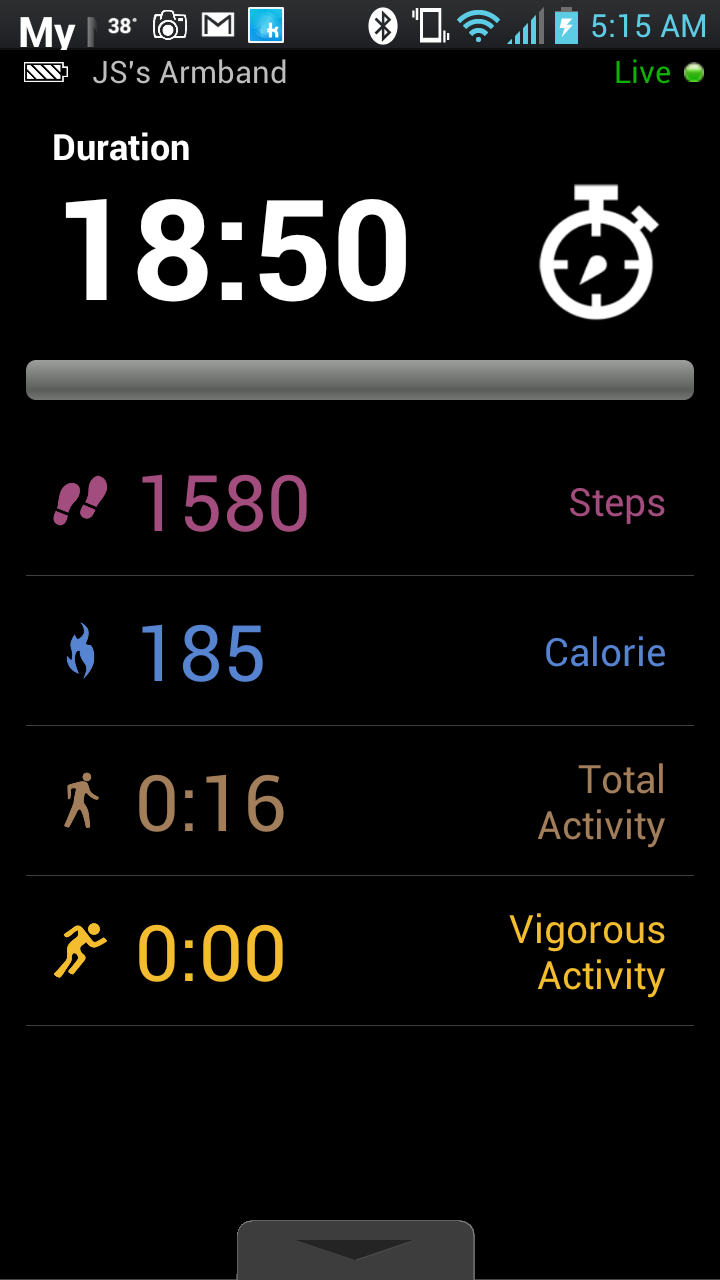
The smartphone app for the BodyMedia device has a Workout tab at the top. Once you click that tab you'll see the following sceen.


You then have the option of what goal you want for your workout. I just did the Quick Start which will bring up the next screen:


I don't have any music on my phone, and I was just testing this out while I worked on the workout review, so I just hit start instead of messing around looking for a playlist. I will try some of the other options and maybe add a playlist when I get to the gym and work on the treadmill. once you hit play, it starts tracking the amount of time that has elapsed, the number of steps you've taken, how many calories you've burned, how much total activity you've done and how many minutes of that were vigorous. I was breathing pretty heavy, but I was only doing a Walk Away the Pounds DVD which you can read about in my review of the workout, so no vigorous activity involved. 


To end the work out, you need to swipe up on the little grey square at the bottom of the screen. This will bring up the following screen. I forgot to get a screen shot of that step while I was doing the workout, so you may notice that the numbers are a bit off.


To end the workout just push End Workout, and you're done! If you want to check out previous workouts, you can click Workout Summary from the first screen shot above. That will get you the screen shot below.


You can then click on any of the workouts to get the summary from that workout. You can see  my summary in the next screenshot. 


I like this option, but I wish I had found it sooner and I wish it showed the max calories burned per minute and the average calories burned per minute during the workout. I'd really like to know both of those without having to do math!

Monday, January 27, 2014

BodyMedia Link

A few years ago, my husband went on a Biggest Loser marathon. He watched about 10 seasons all at once. He then decided that we should get the BodyBugg. I was hesitant, but finally caved. At that point, we didn't have smart phones so we got the Core device. My device had issues from the time I got it, but I just dealt with it. At some point BoddyBugg was bought out by BodyMedia. Eventually, my device needed to be replaced. We both had smart phones so we both upgraded to the Link device. I've had it for just about two months now.
The device has a pedometer, so it can track your step count. It also has sensors on the back that come into contact with your skin. It uses those sensors to determine how many calories you're burning per minute. It also tracks when you're laying down and when you're sleeping. You can input the foods that you eat so it will tell you how many calories you consumed in a day. 

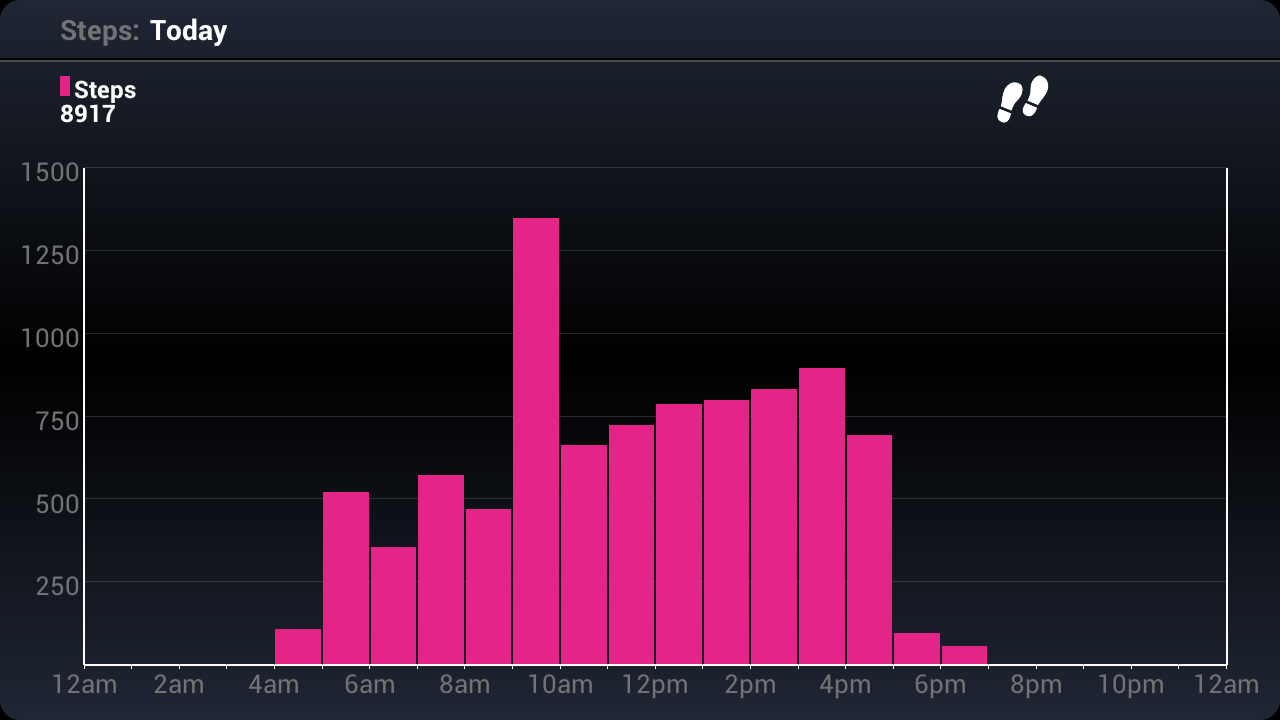
If you get the Link version, you'll be able to hook up the device to your phone via Bluetooth. Through the phone app, you'll be able to see the calories you've burned, the calories you've consumed, the number of steps you've taken, how many minutes of vigorous activity you've done, how many minutes of moderate activity you've done, and how long you slept the night before. If you hold your phone in the portrait mode (upright), you'll have just the totals with a bar chart to show you how far you are from your goal. You can swipe from left to right to scroll back to previous days. If you hold your phone in landscape mode (sideways), you'll be able to swipe from the bottom to the top of the phone to scroll through more charts that will go into a more detailed view of the calories burned, calories consumed, steps taken and amount of sleep.


The app is available for people with the Core device and the Link device, but the Core device will only show information after you've synced the device to the computer. If you have the Link device, you can get live action results. One thing to note, sometimes your device stops talking to your phone and you'll have to tell it to "Go Live." This is a simple process, but some people find it annoying. You just press "Go Live" in the upper right corner of the app. Then it will tell you to push the button on your device. Once you do that, the bar chart will update and the button will change from "Go Live" to "Update." However, the landscape mode charts will not update until you click "Upload."

The website gives you the same information as the app, but you access the more in depth charts by clicking the bar for the areas that you want to look at. The website also gives you notifications to let you know when you hit new records for yourself in terms of the number of calories you've burned, the number of steps you've taken, the number of hours in the day you wore the device, the amount of sleep you've gotten and the amount of moderate or vigorous activity you did in a day. 


We both really like the device. I like that it's an armband instead of a bracelet or something that you put in your pocket. I hate things on my wrists and I whack my hands and wrists on the walls at work often enough that I fear I would ruin anything on my wrists. I'm notorious for washing my pants without checking my pockets. My husband will wash my pants without checking my pockets also, so any device that would be attached to my pants or in my pockets would be ruined very quickly. The BodyMedia device is a bit larger than other devices, but I always wear a t-shirt and usually have a jacket on top of that, so I've never had anyone notice that I'm wearing it. 

The device isn't perfect though. My husband and some other people around the Internet have noticed that it tracks their typing as activity. I haven't noticed that, and I type a lot. My husband can also get into a pretty meditative state while watching TV. He's awake and his eyes are open, but the device thinks he's asleep. It actually happened yesterday while he was driving. When I drive, it shows me with a higher calorie burn, than my normal sitting and typing, which could make sense since I'm usually singing at the top of my lungs and bopping my head around. 

I wouldn't say that the device has motivated me to do more activity, but I don't think that's really the point of the device. It had shown me which activities that I do that burn more calories. For example, we went on a hike yesterday at Soda Creek Falls. It was 3/4 of a mile uphill and then 3/4 of a mile back down that hill. Going up the hill was torture for me. I had to stop a lot to catch my breath. My legs were burning, but the way down I only stopped once to take a picture. I got going at a pretty good clip. I would have thought that going up would have burned more calories, but according to the device, I burned more on the trip down. This is important information for me since historically, I've tried to do the treadmill on an incline thinking that I was burning more calories, but I'm better off going faster on a zero incline. 

The armband is $119.00. To get the info from the device, you'll need to pay $6.95 per month for the online system. When you buy the armband, you get 3 months free. If you use my referral link, you'll get 15% off of the device, and I think any accessories that you buy during the initial purchase. 

It's important to note that you will need to set up the device with a computer, but after the initial set up, you don't ever need to use a computer again as long as you have the Link and a smartphone. You can charge the device with a wall charger. If you get one of those wall chargers that has a USB plugin on one side, you can plug the cord that comes with the device into the USB end and then charge the device without needing a computer.

I will post more about the BodyMedia device in future posts.